


Businesses that sell products and businesses that produce products involve various back-office operations such as order management, inventory management, purchasing, deposits and withdrawals, etc.
Currently, these operations are managed using Excel or handwritten documents, but as the number of business partners and products increases, companies that feel that there are limits to the workload and processing speed, and companies that want to improve operational efficiency through digitalization and increase the added value of their business, will likely consider introducing a business management system such as order management.
Implementing a system has many benefits, such as shortening the man-hours and time from order receipt to delivery, and reducing human errors such as input and transcription errors. However, if you rely on salespeople's sales pitches, prices, and word of mouth when making decisions, you may end up introducing a system with functions or operability that do not suit your company, which may end up being inefficient.
In this article, we would like to introduce how to choose an order management system for a business-to-business (BtoB) company without making mistakes, and how to choose a system that suits your company's business content, from the perspective of our developers and support desk as a SaaS provider.
Table of Contents
What Is Order Management?
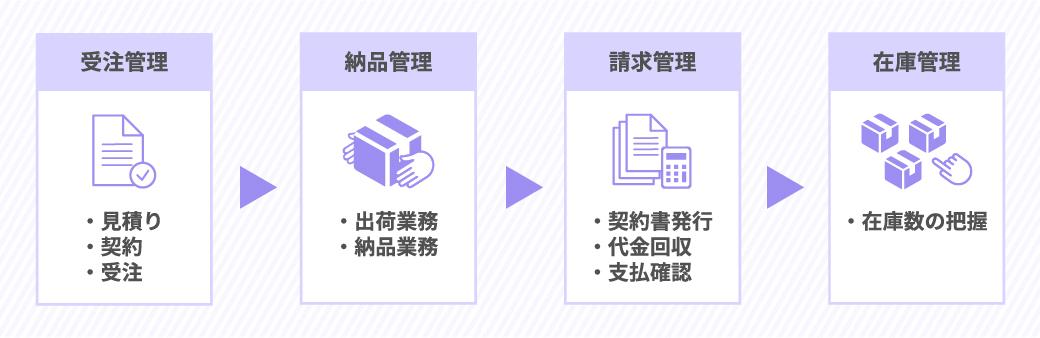
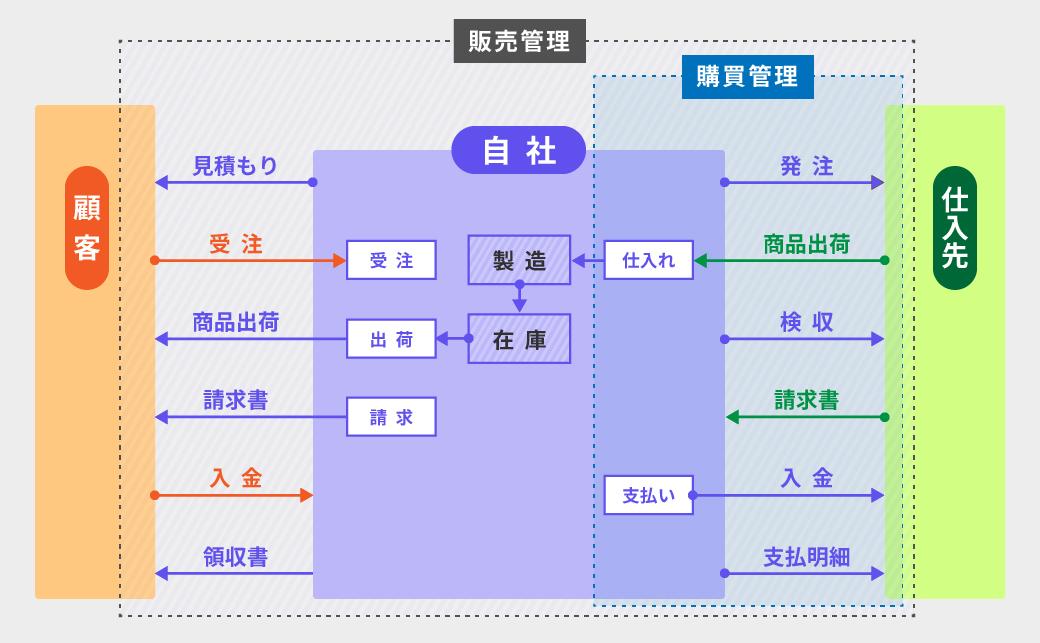
Order management is one of the series of back office operations from product ordering to production and delivery.
We start with an estimate, and once we receive an order or contract, we check the details, and based on the totals, we arrange inventory, purchasing, and production, and adjust the delivery date. The order management cycle consists of creating order slips, invoices, delivery notes, and other documents necessary for transactions until the completion of shipping and delivery, and the completion of deposits and payments.
Administrative work is divided into order management, shipping management, billing management, inventory management, and purchasing management, but in small and medium-sized businesses, accounting, sales, and production management staff involved in ordering work are often involved in multiple tasks, and transactions are carried out by multiple people using Excel.
However, these tasks are complicated, and the process of manually inputting order information via telephone, fax, or paper into Excel, and then re-entering each relevant data one by one and reissuing the form when there are changes, is prone to input errors, transcription errors, and misunderstandings. Progress is not shared in real-time, and the number of confirmations and inquiries increases, and omissions and omissions often occur.
During busy periods, more people and more time are required to input information, increasing costs and increasing the risk of errors.
Improving Efficiency, Automating Work, and Reducing Errors
Against the background of these long-standing issues, there is now a need for a system that can centrally manage back-office operations, including order management, in order to streamline and automate operations, eliminate human errors, and shorten lead times for accurate delivery.
Order management systems once required substantial initial investment and maintenance costs, so they were mainly adopted by large companies. SaaS has made faster, lower-cost implementation possible, while industry-specific services have expanded the available options.
Although SaaS is convenient, it has a variety of functions and services, and you need to choose the one that suits your company's business flow. Next, I would like to compare the features and implementation of SaaS and other systems, Excel systemization, and packaged systems, and summarize the points for successful systemization of order management.
Building an Order Management System with Excel
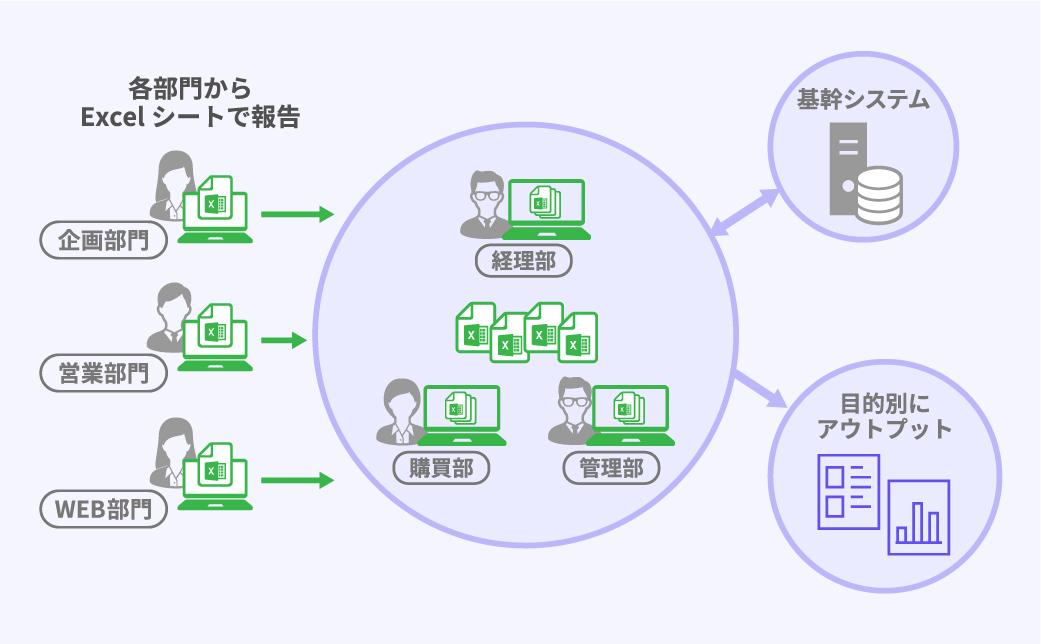
Microsoft Excel is used by many companies for order management, and many business people are familiar with it. Excel is a multi-functional and excellent spreadsheet software that can actually be used to develop business systems.
If you have advanced knowledge, you will be able to design and operate a system using Excel functions such as macros (VBA), sheet functions, and pivot tables.
For example, by using Excel, you can automatically send invoices by email or fax, instruct the inventory department to pick items from order data, and create documents* by analyzing 1 million items of data.
Benefits
- You can design with a high degree of freedom to suit your business.
- There are many teaching materials and the basic functions are learned through school education, so anyone can use it to some extent.
When Combined with a Database Server
- Simultaneous editing by multiple people
- Faster speed (less heavy even on a large scale)
- Can store large amounts of data
Drawbacks
- Cannot edit or update at the same time
- Difficult to create file continuity
- If you use too many complex functions, it will become heavy.
- Systematization requires advanced knowledge
- For advanced collaboration, specialized human resources are required.
Types of Companies Using This Approach
Excel is used for business management in all kinds of companies, regardless of industry.
Even in large companies, Excel is the basic tool for people involved in production, and even companies that tend to have a strong division of labor use Excel as a system.
However, Excel is not suitable for large-scale operations, and when the amount of data increases, the processing speed decreases and the operation becomes slow. In terms of scale, taking an apparel business as an example, when the number of seasonal products exceeds 100 and the number of customers exceeds 60, the data processing speed reaches its limit.
A larger scale is not impossible, but the amount of man-hours required to manage a series of orders would be enormous.
When the amount of data handled becomes large, it becomes necessary to combine it with a database server, and development becomes difficult unless you outsource or have advanced knowledge.
Initial Investment and Maintenance Costs
The annual usage fee for Microsoft 365 Personal that you pay to Microsoft is 12,984 yen per account.
In addition to this, there will be personnel costs for the person in charge of systemization, and if outsourced, development costs and maintenance costs.
Packaged Systems
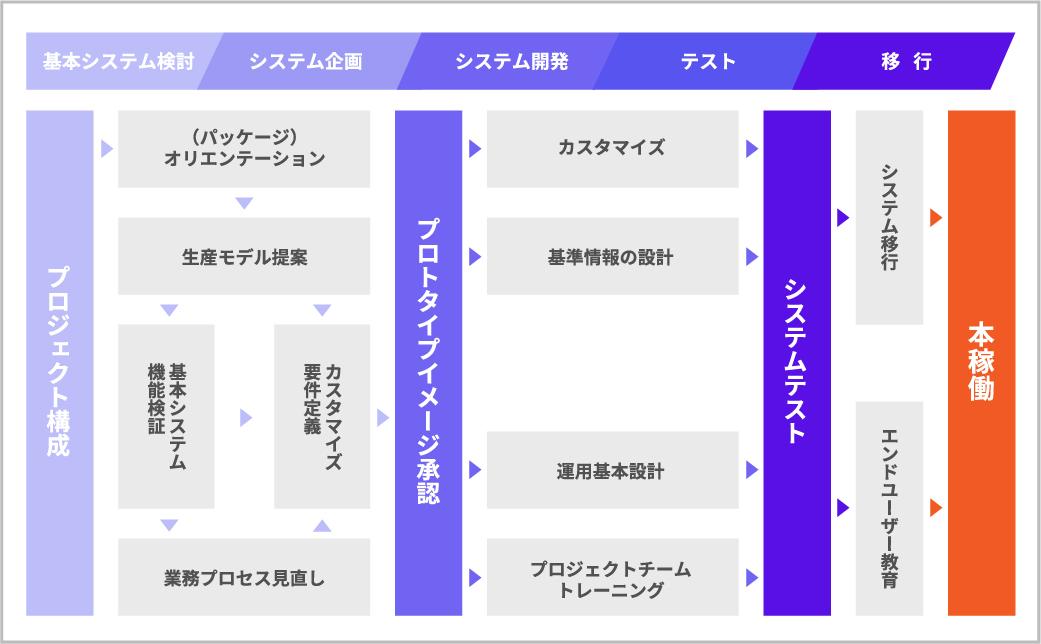
In a packaged system, the system package designed and developed by the company's development department or system development company is installed, used, and operated on a server that can be managed by the company.
Your company or the development vendor must also handle server and system maintenance and post-implementation customization.
Although the initial cost is high and it takes time to implement, it is a big advantage for companies that want to systemize their highly unique business flows as they are, being able to build a system with a high degree of freedom according to their needs.
Benefits
- Flexible customization possible
- Can be linked with other companies' systems
- Highly scalable in functionality and scale after implementation
- You can manage your own data and servers
- Security management is possible with a limited network
Drawbacks
- Maintenance costs (maintenance costs) are high
- If maintenance is performed in-house, highly specialized personnel are required.
- Updates are required in line with legal revisions and social conditions.
- Highly dependent on the environment due to OS limitations
- Even a small amount of customization will increase the cost of renovations.
- If you customize too much, you may not be able to update to the latest version, or you will incur additional costs.
Types of Companies Using This Approach
Companies that have highly unique business flows and large companies that can allocate a fairly large budget and resources to their business systems adopt the package type. Additionally, many companies introduced packaged systems when SaaS-based services were not as popular as they are now, and it is expected that the transition to SaaS will continue in the future.
Initial and Maintenance Costs
Packaged systems have higher initial costs and maintenance costs than systemized Excel or SaaS.
The initial cost for everything from requirements definition to design, development, testing, and release is generally around 20 million yen for a global ERP that works with overseas locations, and 10 million yen for a domestic ERP package.
After installation, maintenance costs will be around 30,000 to 500,000 yen each month, depending on the scale of the system.
SaaS and Cloud Services
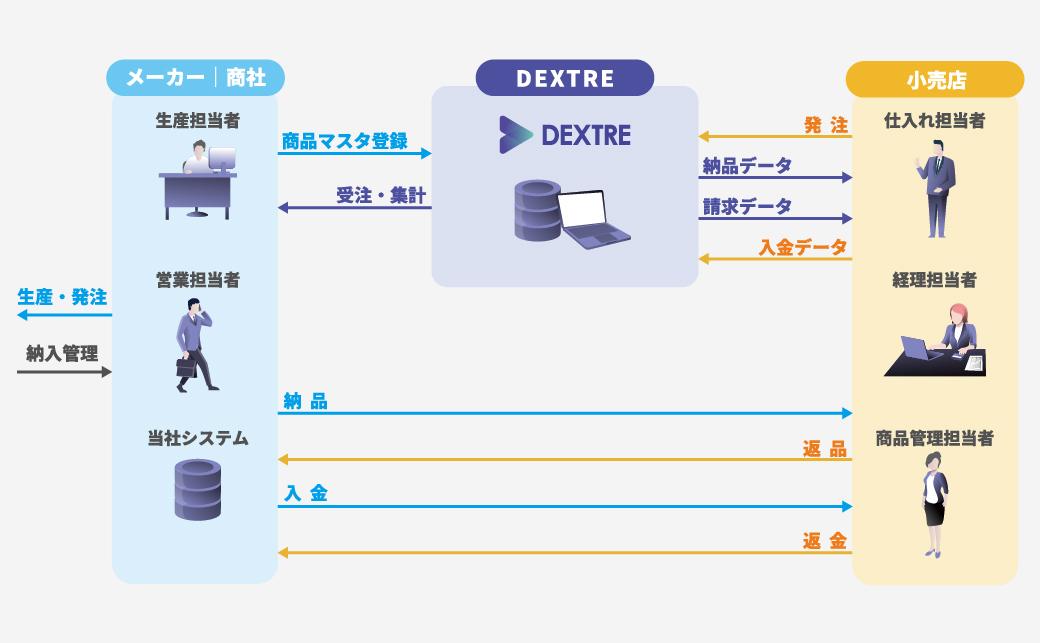
SaaS (Software as a Service) refers to applications and services that are used with a web browser over the Internet. Also called cloud service. Gmail, Zoom, Dropbox, ChatWork, etc. are SaaS that are widely used in business.
Since data and systems are stored and constructed in the cloud (on the internet), you can work from anywhere at any time as long as you have an internet environment, which allows for smooth teamwork with overseas offices and external sales teams, and is also suitable for remote work.
Additionally, a number of SaaS services have been released tailored to different industries, and systems that are optimized for business practices and business flows can be used with a feel similar to actual business operations, making it possible not only to manage orders but also to consolidate all related operations and proceed with transactions efficiently and speedily.
Benefits
- Easy to remember and use with a UI/UX that is close to actual work
- No special skills or knowledge required, quick and easy installation
- No development costs, only monthly maintenance costs
- There are no operational costs such as maintenance or backup, and no specialized staff is required for system management.
- Share and collaborate on data in real time
- Can be used from anywhere as long as there is an online environment
- Multi-device compatible (can be used on smartphones and tablets in addition to PCs)
- always kept up to date
- Automatically updated in response to legal changes
- Functions and services will be updated in line with the times.
Drawbacks
- Can't customize your own
- Unable to expand functionality with a high degree of freedom
- Some services require additional fees to expand functionality.
- Updates depend on the service provider's response.
- Unavailable during maintenance
- The monthly usage fee becomes a maintenance cost while you use it.
What Successful SaaS Implementations Have in Common
SaaS is a relatively new service that has only been popular in Japan for about 10 years, and has only started to become widely established in the past few years. Many companies that have started incorporating SaaS into their business systems have only been using it for a few years, but companies that have successfully implemented SaaS have one thing in common.
it is"Companies that have a clear idea of what they want to do with SaaS"is.
Companies that clearly share with their departments and teams what they want to do with the system and what issues they want to improve have more specific system selection criteria and are able to communicate smoothly with SaaS sales representatives.
SaaS may not be the best choice in every situation. The characteristics of the types of companies we recommend implementing SaaS include companies in the following situations:
- Want to reduce implementation costs
- I want to reduce maintenance costs
- I want it to update automatically
- There is no reliable system development company
- Difficulty in technical communication with system development companies
For companies that find it difficult to adapt even slightly to business practices and systems, SaaS is difficult to use, and we recommend customizable packages or full-scratch in-house system development.
In the next section, I would like to share with those in charge who are considering a new order management system in the current situation described above, how to choose an order management system, from the perspective of a SaaS developer and from my experience supporting companies that have introduced SaaS.
Choosing an Order Management System: Five Success Factors and Four Common Mistakes

First of all, there are four things to focus on when choosing whether Excel systemization, package type, or SaaS is suitable for your company.
Four Basic Principles for Choosing an Order Management System
- You can achieve what you want to achieve
- Be consistent with other company data
- Easy to remember and use
- Can be introduced and operated at an appropriate cost
Check whether the system is suitable for your industry, products, and services, whether it has functions that reflect your business flow and business practices, whether it is easy to use, and whether you can transfer your current data by checking the website, free trial, or contacting the person in charge.
There are also some things that I would like to tell those in charge of companies who are going to select an order management system that they should know.
As we have helped many companies introduce their systems through development and support, we have found that there are five common characteristics among companies that have successfully transitioned smoothly to new systems and successfully penetrated the system within their companies.
This is also a way to make 1 to 4 above easier to understand. We recommend that you organize it before installation!
Success Factor 1: Define What the New System Must Achieve
As I mentioned earlier, this is more important than anything else.
Rather than simply saying, "I want to improve my business," if you have a concrete image of what kind of work you want to do and how you want to make it more efficient, it will be easier to judge whether the system is achievable when you compare systems or have a meeting with the person in charge.
- I want to reduce my current system maintenance costs.
- I want to solve the problem of input errors and transcription errors.
- I want to improve efficiency by linking with other business systems
- I want to automatically create invoices and delivery notes from order data.
- I want all the people in charge to be able to understand the progress of transactions in real time.
- I want to speed up my business and marketing based on automatically analyzed data.
- I want to coordinate all back office operations such as order management, inventory management, billing management, and purchasing management.
Let's identify issues shared by departments and teams, and requests that can be solved by the system. At that time, if you discuss not only the current status, but also the functions you would like to incorporate in the future and the scale of the system in the long term, you will be able to plan for functional expansion after implementation.
Success Factor 2: Assign an Owner and Build a Team
Even if the management issues and the need to implement a new system are shared within the company, if there is no person in charge to proceed with the implementation and migration process, implementation on schedule or effective business improvements cannot be expected.
Implementation and Migration Process
- Review of assignments
- System selection
- Negotiations with sales personnel
- Notifying business partners and requesting system support
- Inform the company and conduct training
The ideal system would be to create a team centered on the person in charge of commercializing the new system and the person in charge of operations after implementation, and to control the entire system through schedule management.
Problems will be less likely to occur if there is a clear position to check the transition status within the company from introduction to penetration, summarize requests, and communicate with outside parties.
Additionally, for those who are reluctant to change their existing procedures, learn a new system, or no longer be able to use their old data formats, having a team member follow up with them can help ease their resistance.
Regarding training, it is a good idea to check the learning cost of the system you want to implement, considering the level of skill required to use the system, and referring to free trials and advice from sales representatives.
Success Factor 3: Set a Budget
- Initial cost
- Running costs (maintenance and updates)
- Period of use
There are several options for systems for back office operations such as order management, such as Excel, package type, and SaaS, and each has different costs.
Calculate the costs required to install and maintain the system based on the website's price plan, requested materials, and estimates from the system development company, and understand the budget for the entire system in as much detail as possible, taking into account the period of use.
For example, we offerSaaS DEXTRE specialized in back office of apparel business, all functions available for 20,000 yen per monthcan. If you use it for 5 years, there are no additional costs such as initial costs and maintenance costs, and the cost is 1.2 million yen for system usage. *For annual contracts
Success Factor 4: Estimate the Time Savings
Before introducing a system, at the consideration stage, you may get the impression that "introducing a system will greatly improve business efficiency," but when comparing and selecting systems, you need to know how it will specifically work for your company.
By comparing and simulating how much work time and lead time can be reduced by replacing the current business flow with an Excel system, package type, or SaaS system, you can understand which tasks can actually be made more efficient and which ones cannot.
For example, let's take a look at how much time an apparel manufacturer's order collection process can be reduced by introducing a system.
| Person in charge working hours | |
| Create a line sheet | 8 hours |
| Prepare photos etc. and upload them to the storage server | half an hour |
| Create an order sheet in Excel | |
| Send download URL to customer by email | 5 minutes/case Example) 8 hours 20 minutes for 100 cases |
| Receive email with Excel attachment | |
| Every time we receive an order, we manually input it into an Excel sheet for tabulation. | 30 minutes/case Example: 15 hours for 30 cases |
| When we receive a request for correction, we correct the information in the Excel for tabulation and the Excel sent by the customer. | 30 minutes/case Example) 5 hours for 10 cases |
| After confirming the order information, create an order confirmation and send it by email. | 30 minutes/case Example: 15 hours for 30 cases |
| Requires approval email exchange with customer | The time it takes for each case depends on the timing of both parties. |
After Implementing the System
If you introduce a SaaS specialized for apparel business to aggregate orders, the same work flow will be completed in 1 hour, 40 minutes, and 5 seconds.
Compared to a work flow that requires manual input in Excel, this will result in approximately 50 hours of work efficiency improvement.
| Person in charge working hours | |
| Register product information | 1 hour |
| Register images by linking them to product information | half an hour |
| Send emails simultaneously from the system to customers | 5 seconds (regardless of number) |
| Customer places an order using the system | |
| The system automatically aggregates | 0 minutes |
| Correction requests are automatically reflected when the order data for each customer is corrected. | 1 minute/case Example: 10 minutes for 10 cases |
| Automatically send order confirmation with one button | |
| Customer approval can be completed with a single button |
By sharing within the company the effects of introducing a system using specific numbers, you will be able to smoothly select a system that meets your goals and requests.
Furthermore, once the system is actually implemented, the time saved by the reduction in work time can be used for creative work such as customer service, product planning, and promotions, which is expected to lead to increased added value for business.
Success Factor 5: Do Not Compromise on Essential Requirements
At the end, it seems like a psychological thing, but it is a very important point for the success of system implementation.
- “Maybe I don’t have to be able to do this much.”
- "I don't really know, but it's cheap so it's probably good."
- "Because the person in charge of the system company recommends it."
For these reasons, if you decide to introduce a new system that you will be using for a long time, the risk of failure is very high.
This is similar to the point of failure introduced below, but if a system has functions or operability that do not fit the company's industry, business flow characteristics, and the challenges and requests it wants to achieve, it will be inconvenient and stressful for anyone in the company to use.
If, after comparing and considering various options, you still cannot find a system that suits your company, you should not force yourself to make a decision, but instead choose "No applicable service" and look for other solutions, or wait for the next opportunity.
Additionally, while selecting a system for order management, internal and external coordination may be difficult. However, I would still like them to maintain a strong will of not compromising on their decisions and to rely on the support desks and personnel at system development companies and SaaS provider companies that will support system implementation.
Four Common Mistakes
- Choose based on price alone
- Do not consider linking with other systems
- Do not assume future functionality expansion
- Without verifying what you want to achieve, just listen to the opinions of the person in charge at the system development company or SaaS provider and implement it.
This is a common cause of failure if you do not follow the five success points introduced earlier.
All systems tend to look good just from the website and what the person in charge says. I almost feel like I'm going to be swept away, but I hold back...
Four Basic Principles for Choosing an Order Management System
- You can achieve what you want to achieve
- Be consistent with other company data
- Easy to remember and use
- Can be introduced and operated at an appropriate cost
I hope you don't forget these four points and reflect on the five success points when selecting a system.
What Is Next for Order Management Systems?
Order management systems come in different formats, such as Excel, packaged, and SaaS, each with their own differences in cost, customization, and implementation process.
We hope that you will compare and consider which one fits your industry, business flow, and can improve your business by referring to this article's "How to choose an order management system: 5 points of success and 4 points of failure."
The Future of SaaS Order Management Systems
It is expected that future order management systems will be centered around SaaS.
In the past few years, SaaS has been released in a variety of industries, and its benefits of being optimized for industry and business, convenience, low cost, and quick implementation are gaining acceptance, and it is becoming popular and established not only among large companies but also among small and medium-sized enterprises.
Although packages and scratch systems will continue to be the mainstream for core areas such as ERP, SaaS is rapidly being introduced for back offices such as order management, BtoB EC, etc.
In apparel SaaS, which is our service area, SaaS will become mainstream as technology advances, and we believe that more companies will conduct much of their business online through collaboration between SaaS systems, and that they will be able to connect with business partners and customers through transactions and services.
Order Management System Comparison
| Building an Order Management System with Excel | Packaged Systems | SaaS (Cloud service) | |
| Cost form | expenses (Monthly usage fee/personnel expenses, commission fees, etc.) | assets (depreciation) | expenses (Monthly usage fee) |
| initial investment | △ Expensive to outsource | × Development costs are high | ◎ No development costs |
| Deployment speed | × Design and development takes time | × Design and development takes time | 〇 Can be used on the same day |
| maintenance cost | △ In addition to the usage fee to Microsoft, there will be labor costs for technical staff if in-house, and maintenance costs if outsourced. | × Maintenance and operation costs such as management fees and renewal fees are required. | 〇 Only the monthly fee is cheap. There are no maintenance costs. |
| learning cost | 〇 With the familiarity of using Excel, minimal additional training is required. | △ Large-scale systems require training in the department in charge. | ◎ UI/UX that can be understood in a short time, no training required |
| customization | 〇 Can be customized within the scope of the software's functions | ◎ Highly customizable | △ Depends on service provider |
| Scalability | △ Requires high technical skills | 〇 free to choose | × Unable to freely expand functionality |
| Currentness | 〇 Updated with Microsoft update program | × Update in-house or by requesting the system company. The system is replaced every few years. | ◎ Automatic update by service provider |
| security | ◎ Risk can be reduced because it can be built in-house. | ◎ Risk can be reduced because it can be built in-house. | 〇 Safe communication is possible with encryption, intrusion detection, access restrictions, etc. (depending on the level of the service provider) |
| Other company's system Cooperation with | △ Requires high technical skills | ◎ Can be developed according to requests | △ Depending on the service provider. An increasing number of SaaS services are available. |
| system failure correspondence | × Either do it yourself or ask a system company. | × Either do it yourself or ask a system company. | ◎ You don't have to deal with it yourself. The service provider will handle the recovery. |
From receiving and placing orders for wholesale transactions
All payments are made in the cloud
Try all features for 30 days
Try it for free